Clustering
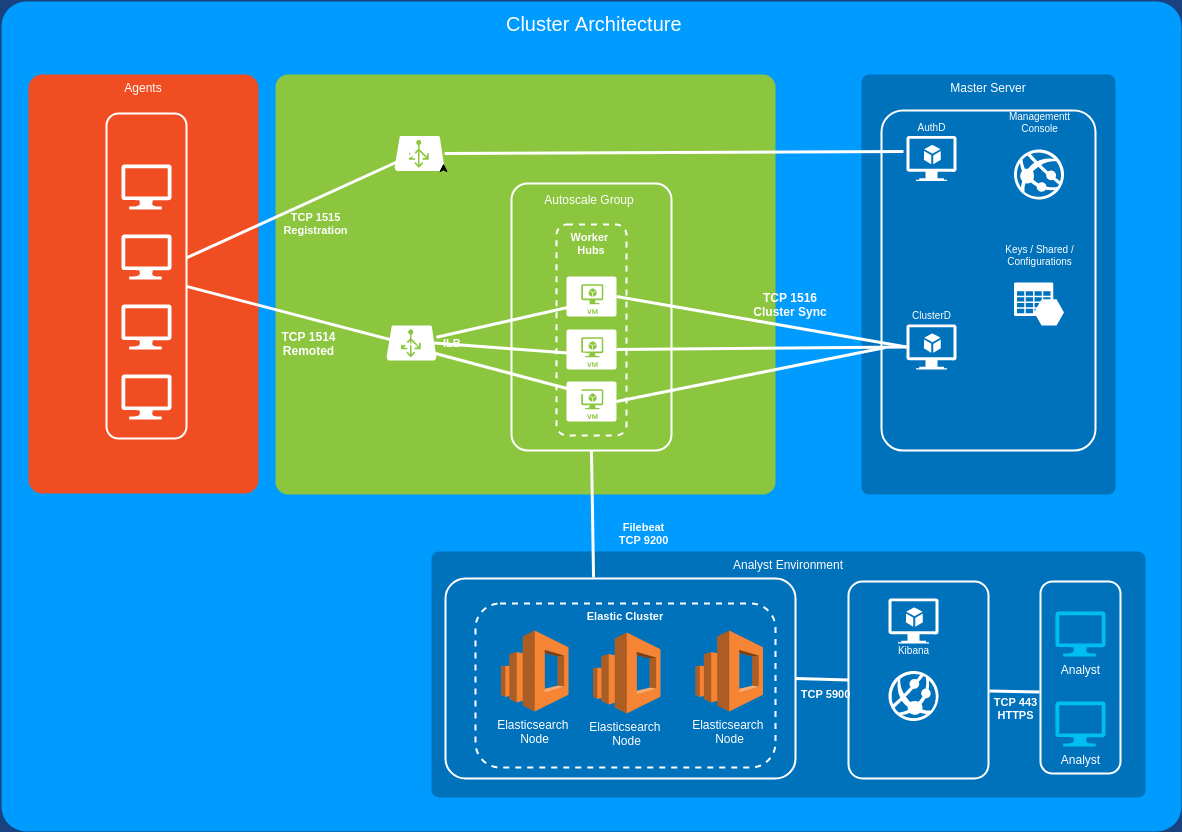
Atomic OSSEC supports manager high availability with a read/write master and one or more
read-oriented worker nodes. Clustering is implemented by the Go ac_cluster stack
(ac-cluster, ac-relayd, and ossec-ac-clusterd), configured from the Hub UI.
The master is the source of truth for agent keys, shared agent configuration, and cluster-wide
settings. Workers synchronize from the master over TLS. Agents should register to the master
(TCP 1515). Agents may send events to a master or worker (TCP/UDP 1514). Workers forward
alerts to the master through ac-relayd (not rsyslog).
Architecture
Master: runs
ac-clusterlistening on TCP 31000 (cluster control) and 31100 (ac-interface). Holds/var/ossec/ac-cluster/etc/.comms.key.Worker: runs
ac-cluster,ac-relayd, andossec-ac-clusterd. Connects to the master’s IP on TCP 31000 and obtains the shared communications key during handshake.Configuration is written to
/var/ossec/etc/ossec.confas an<ac_cluster>stanza. Do not use a legacy<cluster>stanza; that blocks the Go cluster daemon.
What synchronizes
Agent authentication keys (
client.keys)Integrity-listed rules and decoders
Shared agent configurations under
/var/ossec/etc/shared/Agent group assignments
Alerts generated on workers (relayed to the master)
Configuring a Cluster (Master)
Step 1: On the master Hub UI, open Hub Configuration → Hub Configuration → Clustering.
Step 2: Set:
Enable Clustering (
OSSEC_CLUSTER):on(yes/enabledalso accepted)Cluster Mode (
CLUSTER_MODE):masterCluster master ip (
CLUSTER_MASTER_IP): leave empty on the master
Step 3: Save changes and allow the Hub to apply OSSEC configuration.
Step 4: Verify on the master host:
systemctl is-active ac-clusterreportsactivess -lntp | grep 31000showsac-clusterlistening/var/ossec/etc/ossec.confcontains<ac_cluster>with<node_type>master</node_type>/var/ossec/ac-cluster/etc/.comms.keyexists
Configuring a Cluster (Worker)
Step 1: On the worker Hub UI, open Hub Configuration → Hub Configuration → Clustering.
Step 2: Set:
Enable Clustering (
OSSEC_CLUSTER):onCluster Mode (
CLUSTER_MODE):workerCluster master ip (
CLUSTER_MASTER_IP): the reachable IP address of the master Hub (for example192.168.100.222). Do not uselocalhost,0.0.0.0, or a placeholder hostname such asmaster.
Step 3: Save changes and allow the Hub to apply OSSEC configuration.
Step 4: Verify on the worker host:
systemctl is-active ac-cluster ac-relayd ossec-ac-clusterdreportsactive/var/ossec/etc/ossec.confcontains<ac_cluster>withnode_typeworker,master_ipset to the master IP, andclient_dst_port31000/var/ossec/ac-cluster/etc/.comms.keymatches the master (same file contents)/var/ossec/ac-cluster/logs/ac-cluster.logshows a successful connection to the master
Network requirements
Between workers and the master, allow:
TCP 31000 — cluster control / sync (required)
TCP 31100 —
ac-interface(optional; used for cluster interface tooling)
Agent connectivity is unchanged: TCP 1515 (registration, typically master) and TCP/UDP 1514 (agent events). The legacy rsyslog cluster port TCP 6514 is not used.
Disabling clustering
Set Enable Clustering to off, save changes, and confirm <ac_cluster> is removed from
ossec.conf and that ac-cluster / ac-relayd are stopped (or masked).
Notes
/var/ossec/queue/sockets/queueis a unix domain socket used by analysisd. A directory at/var/ossec/queue/queueis not part of normal clustering.Empty
/var/ossec/queue/cluster/may exist from package install layout and is unused byac_cluster.